
Resolve Customer Support Emails
Faster With AI Agents
SeaTicket syncs your support mailbox into one workspace where an AI agent reads every incoming email, analyzes the request in context, and suggests the right action for your team to approve and send.


Email support breaks down
Long before the inbox overflows

Missing context
Relevant context is scattered across past threads and documentation, invisible when a new email arrives.

No structure at arrival
Emails arrive as free-form text with no labels, priority, or owner assigned.

Inconsistent replies
Without a shared reference point, different team members handle the same question differently.

Lost resolutions
Every resolved thread disappears into the sent folder, and the same questions keep coming back.

Inbox outpaces teams
Unread counts climb faster than teams can work through them.

Threads become unreadable
As threads grow longer, the original question and key context get buried.
Sync Your Support Inbox Into One Workspace
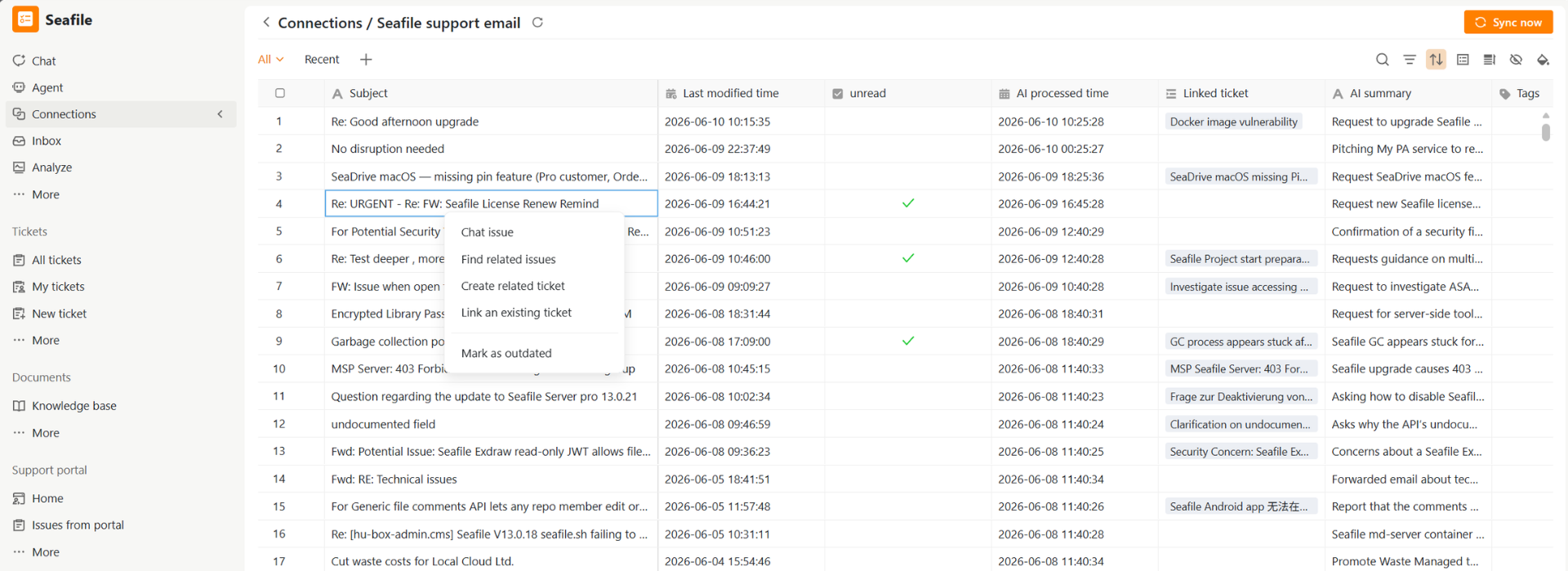
SeaTicket connects to your support address and automatically syncs incoming threads into a centralized workspace where your whole team can see every conversation, track its status, and act on it together.
- Connect any mailbox: support@, hello@, or any address your customers write to
- Every email listed with subject line, last modified time, and status at a glance
- AI summaries for each email, so teams can quickly find what they need
- Open any thread to read the full conversation
- Link threads to tickets or add tags
- Reply to the customer from inside SeaTicket without switching to your email client
Let AI Agents Process Emails and Suggest the Right Action
The AI agent runs automatically on every new email thread and every new reply added to an existing thread. Each run produces a structured output your team can read and act on immediately.
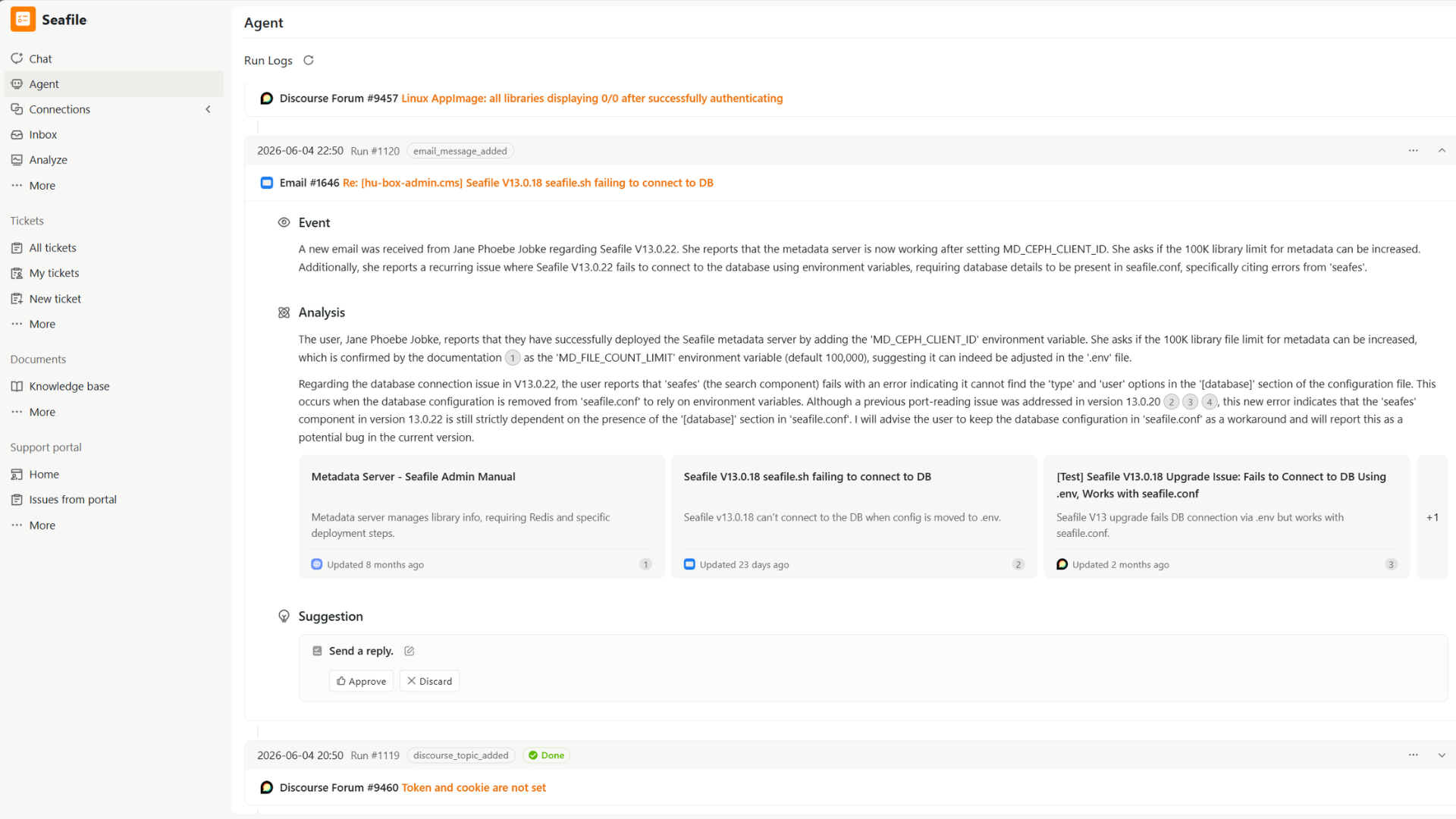
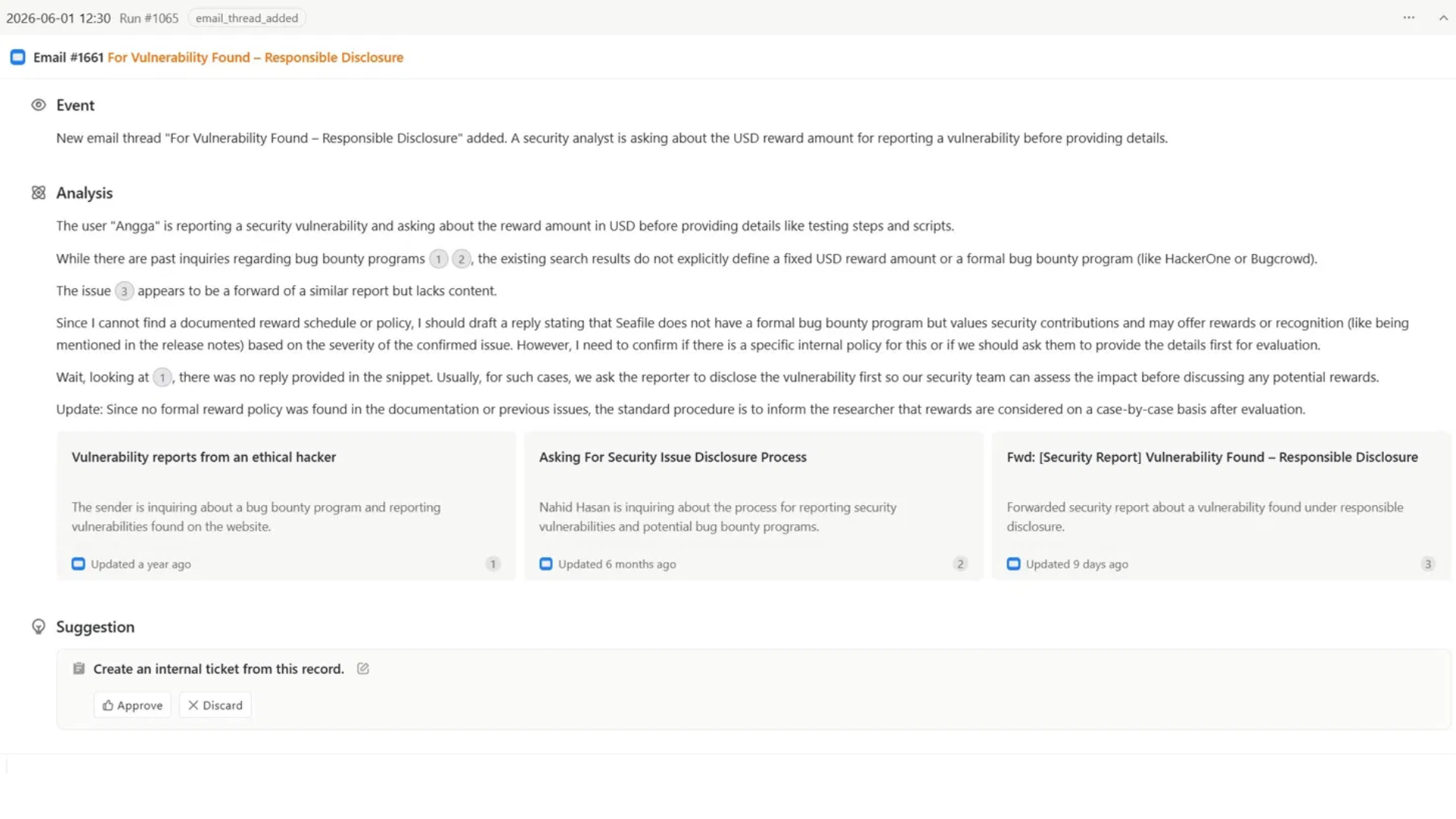
Every agent run shows the same clear structure: what happened, why it matters, and what to do next.
- Every new email and new reply triggers a fresh agent run automatically
- Searches past email threads, forum discussions, documentation, and connected knowledge sources for relevant context
- Produces an Event summary, a full Analysis with citations your team can inspect
- Suggests the right action: a ready-to-send reply draft or creating an internal ticket
- Open the draft to review and edit it before approving, or discard
- Approved replies sent from SeaTicket using your support address
From Customer Email to Resolved Request in four steps
Click a step to learn more
Email syncs in
New threads and replies appear in SeaTicket automatically.
Agent reads and searches
It reads the full thread then looks through your connected sources.
Analysis ready to review
The agent produces a summary, a full analysis, and a suggested action with sources.
Review, edit, and send
Edit the draft if needed, approve it, and the reply goes to the customer.
Why Teams Use SeaTicket for Email Support
One shared view
Every incoming email is visible to the whole team, regardless of which inbox it landed in.
Runs on every email
The agent triggers automatically on every new thread and every new reply.
Searches before it suggests
The agent looks through past threads, docs, and forum posts before drafting anything.
Sources you can check
Every suggestion shows which threads and documents the agent drew from.
Nothing sends without approval
A reply only leaves SeaTicket when your team says it is ready.
Good answers stay
Resolved threads can be saved as knowledge for the next time.
Give AI the Full Picture Behind Every Request
SeaTicket connects your support mailbox with your entire support ecosystem, giving the AI agent the full context it needs before drafting a reply or suggesting an action.
 GitHub issues
 Discourse forums
 Email support
 Documentation sites
 Notion
 Seafile libraries
 Websites
 Knowledge bases
Spend Less Time in Your Inbox
And More Time Resolving Customer Issues
SeaTicket turns incoming customer emails into structured, reviewable drafts your team can approve and send in minutes.